Data structure
The basic unit of data in NOMAD is the entry. An entry typically corresponds to one file in an upload that NOMAD recognizes and processes, such as the main output file of a simulation code, a measurement file, or an ELN form. Each entry has its own id and is found, viewed, and accessed independently of the others. Everything NOMAD knows about an entry is kept in one structured document, the entry's archive.
To understand how the data in an entry is organized, you need three concepts, which this page covers in turn:
- The archive: concrete data of a single entry.
- The schemas: definitions that this data follows.
- The schema language: language in which those schemas are written.
Together, they are what makes data in NOMAD more than a collection of files. Because every archive follows a schema, NOMAD knows what each value means, what type and unit it has, and how it relates to the rest of the entry. This allows data from different sources to be searched, compared, and processed in the same way.
This page is background reading: it describes the ideas that the rest of the documentation builds on, rather than the steps to follow. If you are looking for those steps, the how-to guides on schemas are the place to start.
Archives
Each entry in NOMAD has an archive associated with it which stores all of the data related to that entry. Every archive is an instance of an EntryArchive which has the following structure:
%%{init: {'flowchart': {'curve': 'stepBefore', 'nodeSpacing': 12}}}%%
flowchart LR
    archive["archive (EntryArchive)"] --- data["<div style='width:11em;text-align:left'>data (EntryData)</div>"]
    archive --- metadata["<div style='width:11em;text-align:left'>metadata (EntryMetadata)</div>"]
    archive --- results["<div style='width:11em;text-align:left'>results (Results)</div>"]
    archive --- workflow2["<div style='width:11em;text-align:left'>workflow2 (Workflow)</div>"]
archive --- definitions["<div style='width:11em;text-align:left'>definitions (Package)</div>"]Of these subsections, data carries the entry's actual content, while the others describe, summarize, or relate it:
data: Holds the entry-specific content and is where custom schemas plug in. A subclass ofEntryData. See The data section.metadata: Added by NOMAD during processing. It contains ids, timestamps, authors, datasets, references, and an index of all the sections and quantities used in the entry, which search relies on. Users and plugins cannot extend it. Instance ofEntryMetadata.results: A summary of the entry that follows a fixed structure, independent of the data type, with the subsectionsmaterial,method,properties, andeln. Parsers or uploaded archive files can populate it directly, but it is usually populated during normalization. Its structure is controlled by NOMAD, and some of the search is built on it. Instance ofResults.workflow2: Describes the entry as a workflow of tasks with inputs and outputs. Instance ofWorkflow.definitions: is only filled for schema entries and contains the definitions they provide. Instance ofPackage.
Note
There are currently two versions of the workflow schema, stored in two top-level EntryArchive subsections, workflow and workflow2. New schemas should use workflow2.
The data section
data is the subsection that carries the entry's actual content. The others describe the entry around it: metadata identifies it, results summarizes it, and workflow2 describes the logical steps on how the data was produced. For most entries, data is where the interesting information lives.
It is also the only part of the shared entry structure that is meant to be extended. EntryData itself defines no quantities of its own, but NOMAD accepts any section that inherits from it as the content of data. Every entry has exactly one data section, but the definition behind it differs from entry to entry, and comes from the parser, the plugin schema, or the ELN schema that produced the entry. These definitions should re-use base sections as much as possible.
Inheriting EntryData does more than place a section in the archive:
- NOMAD offers the section in the dialog for creating a new entry in the GUI.
- The entry type used in search is taken from the name of the section.
- Because
EntryDatabuilds onArchiveSection, the section can define anormalizefunction that NOMAD runs during processing.
For how to write such a section, see How-to guides > ... > Define a schema. For how to deliver it, either as a plugin or as an uploaded file, see How-to guides > ... > Start working with schemas.
Serialized forms
The structure above is abstract: it is independent of how the data is represented in computer memory, in a file, or in a database. The same archive therefore has several serialized forms:
- You can write
.archive.jsonor.archive.yamlfiles yourself. - NOMAD internally stores all processed data in message pack.
- Some of the data is stored in MongoDB or Elasticsearch.
- When you request processed data via the API, you receive it in JSON.
- When you use the ArchiveQuery, all data is represented as Python objects (see also the example in the Python schema documentation).
Whatever the representation, you can rely on the structure, names, types, shapes, and units defined in the schema to interpret the data.
Schemas
The previous section described the shape of an archive. A schema tells you how to interpret the data in that shape: what each value means, how values relate to each other, and, optionally, which type, dimensions, or physical unit a value must have. Schemas are grouped into a schema package, which is how they are delivered to NOMAD.
There is no single NOMAD schema. The sections around data — metadata, results, and workflow2 — are defined by NOMAD and are the same in every archive, but data follows a different schema in every kind of entry. When you read an entry, the definition behind its data section is what tells you what the entry actually contains. When you have data of your own, writing a schema is how you tell NOMAD what it contains.
Where schemas come from
A schema reaches NOMAD in one of three ways, and which one you use decides who can see it and what it can do.
- Built into NOMAD. The definitions that ship with the
nomad-labpackage itself: the rootEntryArchiveandmetadatainnomad.datamodel, and the shared, domain-independent definitions innomad.datamodel.metainfo, including the built-in base sections. They are present in every installation. - A Python schema package in a plugin. A plugin declares a schema package entry point whose definitions are loaded at startup. Once the plugin is installed, the schema is available to every user of that installation, and it can carry
normalizefunctions that NOMAD runs during processing. - An uploaded archive file. Any user can upload a
.archive.yamlor.archive.jsonfile that fills thedefinitionssection. NOMAD stores the package and makes it available within the upload it was uploaded to. No installation and no plugin development is needed, but the schema does not leave that upload, and it cannot carrynormalizefunctions.
The two syntaxes describe the same thing, and there is a one-to-one translation between them. For the trade-off between them and for the mechanics of each route, see How-to guides > ... > Start working with schemas.
Re-use and interoperability
Schemas are rarely written from scratch. A section definition can inherit from another one, and inheriting brings over not only its quantities and subsections but also the functionality attached to them.
Re-use is also where interoperability comes from. A schema of your own can describe your data in all the detail you want, and that is the point of it — but detail is not the same as interoperability, and users and machines that are not familiar with the specifics will struggle to interpret it. What makes data interpretable beyond the context it was created in is that different schemas describe the same concepts with the same definitions. Because a shared definition presents a fixed interface, search, visualizations, ELN forms, and analysis code can be written once and then work for every schema that inherits it. The goal is to re-use as much as possible instead of re-inventing the same sections over and over again, and the tools built around a definition are what makes re-using it worthwhile.
No central structure can do this work for you. NOMAD cannot anticipate what every method and every lab needs to record, so the definitions that describe your data well are ones you and your community share and maintain. Interoperability is built from the bottom up, by agreeing on definitions, rather than handed down from a common format.
The workflow schema is one example. It gives every entry a common way to describe tasks with their inputs and outputs, and because all entries use the same definitions, the UI can offer a card with workflow visualization and navigation for every entry that has a workflow inside.
The definitions that schemas inherit from most often are NOMAD's built-in base sections. They are the subject of the next page: Base sections.
Note
A second and much thinner layer of interoperability is the results section, which FAIRmat maintains as part of NOMAD itself. Its structure is fixed and the same in every entry, whatever the entry contains, which is exactly what limits it: because it has to fit all of NOMAD at once, it can only ever capture a shallow common denominator, and it is not a substitute for schemas your data actually fits. Typically a parser populates the entry's own schema, while results is filled during normalization — automatically when the schema inherits base sections that fill it in their own normalize functions, and otherwise by a translating normalization algorithm.
Built-in, plugin, and uploaded schemas differ in where they live and who can use them, but not in what they are made of. That common vocabulary — sections, quantities, subsections, and packages — is fixed by the schema language.
Schema language
Schemas are written in a schema language. Ours is called the NOMAD Metainfo, a name that is evocative of the rich metadata information that should be associated with research data and made available in a machine-readable format. It provides the means to define sections, to organize definitions into packages, and to define section properties, namely subsections and quantities.
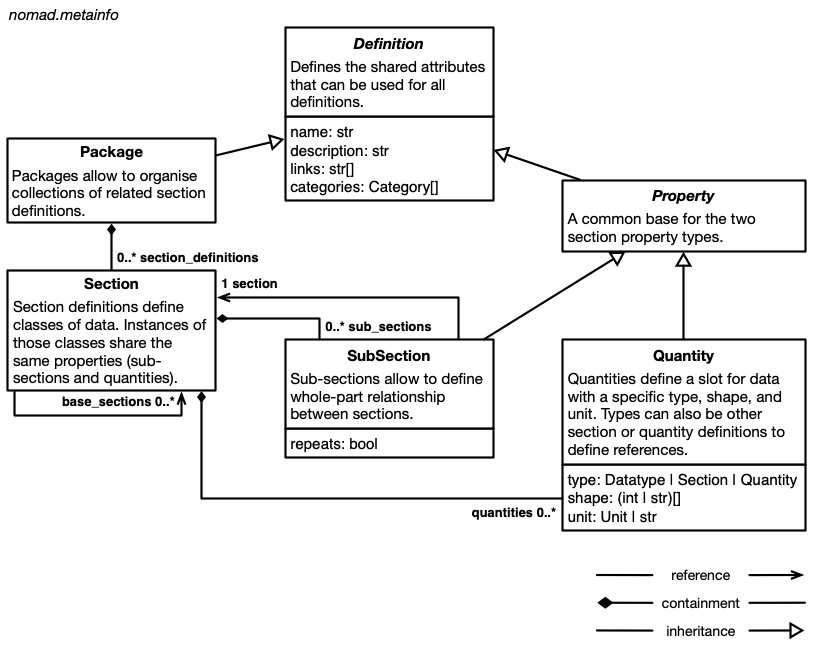
Packages contain section definitions, and section definitions contain definitions for subsections and quantities. Sections can inherit the properties of other sections. Subsections define containment hierarchies for sections, while quantities can use section definitions, or other quantity definitions, as a type to define references.
If you are familiar with other schema languages and means of defining structured data (JSON schema, XML schema, pydantic, database schemas, ORM, etc.), you might recognize these concepts under different names. Sections are similar to classes, concepts, entities, or tables. Quantities are related to properties, attributes, slots, or columns. Subsections might be called containment or composition. Subsections and quantities with a section type also define relationships, links, or references.
Our guide on how to define a schema explains these concepts with an example.
For the language itself — every attribute a definition can carry, the available quantity types, and the naming conventions — see Reference > Schema language.