From files to data
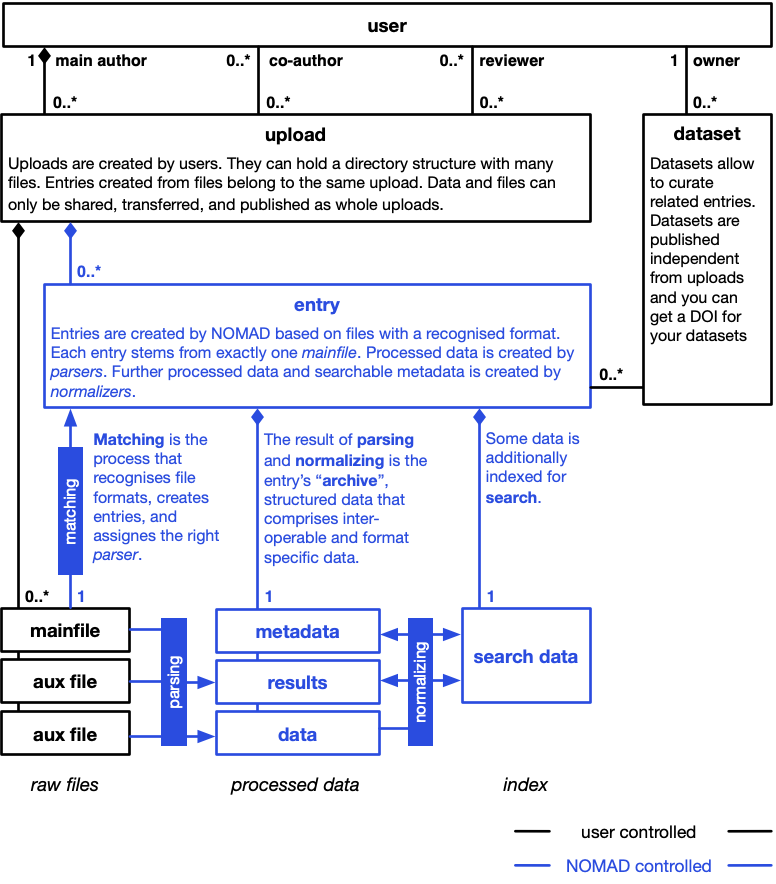
NOMAD is based on a bottom-up approach to data management. Instead of only supporting data in a specific predefined format, we process files to extract data from an extendable variety of data formats.
Converting heterogenous files into homogeneous machine actionable processed data is the basis to make data FAIR. It allows us to build search interfaces, APIs, visualization, and analysis tools independent from specific file formats.
Projects and uploads
Users create projects to organize files and entries. A project can contain many files arranged in directories. Project owners can invite collaborators and publish the project. The files in a project are called raw files.
In NOMAD's backend, each project is represented by an upload resource. Technical documentation therefore uses terms such as upload API, upload ID, and upload processing for operations on the corresponding backend resource. Raw files are managed by users and they are never changed by NOMAD.
Note
As a rule, raw files are not changed during processing (or otherwise). However, to achieve certain functionality, a parser, normalizer, or schema developer might decide to bend this rule. Use-cases include the generation of more mainfiles (and entries) and updating of related mainfiles to automatize ELNs, or generating additional files to convert a mainfile into a standardized format like nexus or cif.
Files
We already said that all uploaded files are raw files. Recognized files that have an entry are called mainfiles. Only the mainfile of the entry is passed to the parser during processing. However, a parser can call other tools or read other files. Therefore, we consider all files in the same directory of the mainfile as auxillary files, even though there is not necessarily a formal relationship with the entry. If formal relationships with aux files are established, e.g. via a reference to the file within the processed data, is up to the parser.
Entries
All uploaded raw files are analysed to find files with a recognized format. Each file that follows a recognized format is a mainfile. For each mainfile, NOMAD will create a database entry. The entry remains matched to the mainfile. The entry ID, for example, is a hash over the upload ID and the mainfile path (and an optional key) within the upload. This matching process is automatic for parser-supported files.
Note
Users can also create schema-based entries from the GUI. NOMAD creates an editable mainfile for such an entry and processes it in the same way as other mainfiles. The user controls the file content through the data editor; NOMAD creates the processed data from that file.
Processing
Processing normally starts automatically when files in a project change or a schema-based entry is saved. A user with write access can also reprocess an editable project manually. Processing consists of parsing, normalizing, and persisting the created data, as explained under Explanation > Processing.
Parsing
Parsers transform a mainfile into the structured, machine-processable tree of
data called the entry's archive, or processed data. For a
parser-supported file, matching selects one installed parser based on the file
format. A schema-based entry instead uses NOMAD's native archive-file parser to
load the data entered in the GUI; its schema can provide normalize functions
that interpret additional files selected in the entry. A hybrid parser can
match an added file and use it to create an editable schema-based entry.
The Tutorials > ... > NOMAD parsing approaches compares these patterns. The How-to guides > ... > Parsers explains parser matching and registration. The Distribution Details section of a NOMAD deployment's landing page lists the installed parser entry points. Details about the file formats supported by each parser should be maintained in the corresponding plugin documentation.
Note
A special case is the parsing of NOMAD archive files. Usually a parser converts a file
from a source format into NOMAD's archive format for processed data. But users can
also create files following this format themselves. They can be uploaded either as .json or .yaml files
by using the .archive.json or .archive.yaml extension. In these cases, we also considering
these files as mainfiles and they are also going to be processed. Here the parsing
is a simple syntax check and basically just copying the data, but normalization might
still modify and augment the data substantially. One use-case for these archive files,
are ELNs. Here the NOMAD UI acts as an editor for a respective .json file, but on each save, the
corresponding file is going through all the regular processing steps. This allows
ELN schema developers to add all kinds of functionality such as updating referenced
entries, parsing linked files, or creating new entries for automation.
Normalizing
While parsing converts a mainfile into processed data, normalizing is only working on the processed data. Learn more about why to normalize in the documentation on structured data. There are two principle ways to implement normalization in NOMAD: normalizers and normalize functions.
Normalizers are small programs that take processed data as input. There is a list of normalizers registered in the NOMAD configuration. In the future, normalizers might be added as plugins as well. They run in the configured order. Every normalizer is run on all entries and the normalizer might decide to do something or not, depending on what it sees in the processed data.
Normalize functions are special functions implemented as part of section definitions in Python schemas. There is a special normalizer that will go through all processed data and execute these function if they are defined. Normalize functions get the respective section instance as input. This allows schema plugin developers to add normalizing to their sections. Read about our structured data to learn more about the different sections.
Storing and indexing
As a last technical step, the processed data is stored and some information is passed into the search index. The store for processed data is internal to NOMAD and processed data cannot be accessed directly and only via the archive API or ArchiveQuery Python library functionality. What information is stored in the search index is determined by the metadata and results sections and cannot be changed by users or plugins. However, all scalar values in the processed data are also index as key-values pairs.
Attention
This part of the documentation should be more substantiated. There will be a learn section about the search soon.